Showing posts with label Google Summer of Code 2015. Show all posts

Thursday, July 9, 2015

astroplan Tutorial 1

I'm long overdue for a post about my Google Summer of Code project with astropy, called astroplan. For background on GSoC and astroplan, see this earlier blog post.

Why so silent?

I haven't posted in a while because, well, we've been working on the code! You can see the progress in our GitHub repository, where I've made a few big contributions over the past few weeks in pull requests 11 and 14. Most of the discussion about the development of the core functionality of astroplan is in those pull requests. 

Quick Tutorial: observation planning basics

Say you're going to observe sometime in the near future, and you need to figure out: the time of sunrise and sunset, the altitude of your target at a particular time from your observatory, and when the target next transits the meridian. Let's use Vega as our target and Mauna Kea as the location of our observatory, and use astroplan to find the answers:

from astropy.coordinates import EarthLocation
from astropy.time import Time
from astroplan import Observer, FixedTarget
import astropy.units as u

# Initialize Observer object at the location of Keck
keck = EarthLocation.from_geodetic('204d31m18s', '19d49m42s', 4160)
obs = Observer(location=keck, timezone='US/Hawaii')

# Initialize FixedTarget object for Vega using from_name
vega = FixedTarget.from_name('Vega')

# Pick the time of our observations in UTC
time = Time('2015-07-09 03:00:00')

# Calculate the time Vega rises above 30 degress: 
next_rise_vega = obs.calc_rise(time, vega, horizon=30*u.deg)
print('Vega rises: {0} [ISO] = {1} [JD]'.format(next_rise_vega.iso, next_rise_vega.jd))
The above code returns:
Vega rises: 2015-07-09 05:24:22.732 [ISO] = 2457212.72526 [JD]
The time at next rise is an astropy Time object, so it's easy to convert it to other units. Now let's do the rest of the calculations:
# Calculate time of sunrise, sunset
previous_sunset = obs.sunset(time, which='previous')
next_sunrise = obs.sunrise(time, which='next')
print('Previous sunset: {}'.format(previous_sunset.iso))
print('Next sunrise: {}'.format(next_sunrise.iso))

# Is Vega up at the present time?
vega_visible = obs.can_see(time, vega)
print('Is Vega up?: {}'.format(vega_visible))

# When will Vega next transit the meridian?
next_transit = obs.calc_meridian_transit(time, vega, which='next')
print("Vega's next transit: {}".format(next_transit.iso))
prints the following:
Previous sunset: 2015-07-08 05:02:09.435
Next sunrise: 2015-07-09 15:53:53.525
Is Vega up?: True
Vega's next transit: 2015-07-09 09:51:18.800
Now let's say you need a half-night of observations. What are the times of astronomical sunrise/sunset and midnight?
# Sunrise/sunset at astronomical twilight, nearest midnight:
set_astro = obs.evening_astronomical(time, which='previous')
rise_astro = obs.morning_astronomical(time, which='next')
midnight = obs.midnight(time)
print('Astronomical sunset: {}'.format(set_astro.iso))
print('Astronomical sunrise: {}'.format(rise_astro.iso))
print('Midnight: {}'.format(midnight.iso))
which prints:
Astronomical sunset: 2015-07-08 06:29:05.259
Astronomical sunrise: 2015-07-09 14:27:05.156
Midnight: 2015-07-09 10:27:59.015
You can also view this code in an iPython Notebook here.
Tuesday, June 16, 2015

UT1, UTC and astropy

What's the difference between UTC and UT1?

Keeping time is a messy business. Depending on your perspective, you may want one of two (or more) time systems:
  1. As humans, we want a time system that ticks in seconds on the surface of the Earth contiguously and forever, both backwards and forwards in time.
  2. As astronomers, we want a time system that will place stationary astronomical objects (like distant quasars) at the same position in the sky with predictable periodicity.
It turns out that reconciling these distinct systems is a difficult task because the Earth's rotation period is constantly changing due to tidal forces and changes in the Earth's moment of inertia. As a result, the number of seconds in a mean solar day or year changes with time in ways that are (at present) impossible to predict, since the variations depend on plate tectonics, large-scale weather patterns, earthquakes, and other stochastic events.

The solution is to keep these two time systems independent.

Coordinated Universal Time (UTC)

The first time system is kept by atomic clocks which tick with no regard for the Earth's rotation. If that system was left uncorrected over many years, solar noon would no longer occur at noon on the atomic clocks, because 24 hours × 60 minutes × 60 seconds is not precisely the rotation period of the Earth. To make up for this, the atomic clock timekeeping system gets leap seconds added to it every so often to keep the atomic clock time as close as possible (within 0.9 seconds) to mean solar time. We call this Coordinated Universal Time (UTC).

Universal Time 1 (UT1)

The second time system is kept by very precisely, for example, by measuring the positions of distant quasars using Very Long Baseline Interferometry. This time is therefore defined by the rotation of the Earth, and varies with respect to UTC as the Earth's rotation period changes. The orientation of the Earth, which must be measured continuously to keep UT1 accurate, is logged by the International Earth Rotation and Reference Systems Service (IERS). They update a "bulletin" with the most recent measurements of the Earth's orientation, called Bulletin B, referred to within astropy as the IERS B table.

Calculating UT1-UTC with astropy

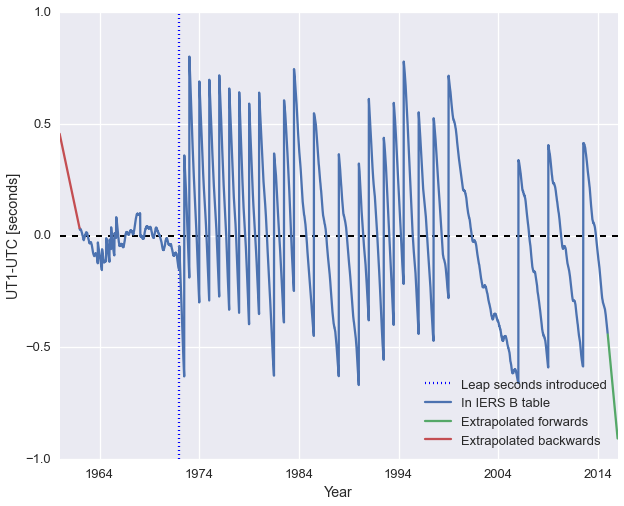
The difference between UTC and UT1 are therefore modulated by (1) changes in the Earth's rotation period and (2) leap seconds introduced to try to keep the two conventions as close to each other as possible. To compute the difference between the two is simple with astropy, and reveals the strange history of our dynamic time system.

The following code and plots are available in an iPython notebook for your forking pleasure.

Using IERS B for backwards conversion

from __future__ import print_function
import numpy as np
import datetime
import matplotlib.pyplot as plt

# Make the plots pretty
import seaborn as sns
sns.set(context='talk')

# Generate a range of times from 1960 (before leap seconds)
# to near the present day
dt_range = np.array([datetime.datetime(1960, 1, 1) + 
                     i*datetime.timedelta(days=3.65) for 
                     i in range(5600)])
# Convert to astropy time object
from astropy.time import Time
time_range = Time(dt_range)

# Calculate the difference between UTC and UT1 at those times,
# allowing times "outside of the table"
DUT1, success = time_range.get_delta_ut1_utc(return_status=True)

# Compare input times to the times available in the table. See
# https://github.com/astropy/astropy/blob/master/astropy/utils/iers/iers.py#L80
from astropy.utils.iers import (TIME_BEFORE_IERS_RANGE, TIME_BEYOND_IERS_RANGE,
                                FROM_IERS_A, FROM_IERS_B)
extrapolated_beyond_table = success == TIME_BEYOND_IERS_RANGE
extrapolated_before_table = success == TIME_BEFORE_IERS_RANGE
in_table = success == FROM_IERS_B

# Make a plot of the time difference
fig, ax = plt.subplots(figsize=(10,8))
ax.axhline(0, color='k', ls='--', lw=2)

ax.plot_date(dt_range[in_table], DUT1[in_table], '-',
             label='In IERS B table')
ax.plot_date(dt_range[extrapolated_beyond_table], 
             DUT1[extrapolated_beyond_table], '-',
             label='Extrapolated forwards')
ax.plot_date(dt_range[extrapolated_before_table], 
             DUT1[extrapolated_before_table], '-',
             label='Extrapolated backwards')

ax.set(xlabel='Year', ylabel='UT1-UTC [seconds]')
ax.legend(loc='lower left')
plt.show()

There have been 25 leap seconds so far to date (as of summer 2015) since they were introduced in 1972.

Using IERS A for forwards conversion

# Download and cache the IERS A and B tables
from astropy.utils.iers import IERS_A, IERS_A_URL, IERS_B, IERS_B_URL
from astropy.utils.data import download_file
iers_a_file = download_file(IERS_A_URL, cache=True)
iers_a = IERS_A.open(iers_a_file)
iers_b_file = download_file(IERS_A_URL, cache=True)
iers_b = IERS_A.open(iers_b_file)

# Generate a range of times from 1960 (before leap seconds)
# to near the present day
dt_range = np.array([datetime.datetime(1970, 1, 1) + 
                     i*datetime.timedelta(days=36.5) for 
                     i in range(525)])
# Convert to astropy time object
from astropy.time import Time
time_range = Time(dt_range)

# Calculate the difference between UTC and UT1 at those times,
# allowing times "outside of the table"
DUT1_a, success_a = time_range.get_delta_ut1_utc(return_status=True, iers_table=iers_a)
DUT1_b, success_b = time_range.get_delta_ut1_utc(return_status=True, iers_table=iers_b)

# Compare input times to the times available in the table. See
# https://github.com/astropy/astropy/blob/master/astropy/utils/iers/iers.py#L80
from astropy.utils.iers import (TIME_BEFORE_IERS_RANGE, TIME_BEYOND_IERS_RANGE,
                                FROM_IERS_A, FROM_IERS_B)

in_table_b = success_b == FROM_IERS_B

# Make a plot of the time difference
fig, ax = plt.subplots(figsize=(10,8))
ax.axhline(0, color='k', ls='--', lw=2)

ax.plot_date(dt_range, DUT1_a, '-',
             label='IERS a table')
ax.plot_date(dt_range[in_table_b], DUT1_b[in_table_b], 'r--',
             label='IERS B table')

ax.set(xlabel='Year', ylabel='UT1-UTC [seconds]')
ax.legend(loc='upper right')
plt.show()

The IERS A table will know about near-future leap seconds and provide more accurate forward predictions in time.


Tuesday, May 26, 2015

Introduction to GSoC 2015

What is Google Summer of Code?

Google Summer of Code is a really great opportunity for early-career astronomers to learn to code with forethought for open source projects that will actually get used by other astronomers — something we often aspire to do, but are rarely taught to do. To begin a GSoC project, you work one-on-one (or in my case, two-on-one) with mentors who are experienced open source developers to prepare a proposal for a software tool you would like to make with their help, including a detailed description of the project's deliverables and timeline.

In the astronomical world, one source of GSoC projects is astropy, our friendly neighborhood Pythonic astronomical Swiss-army knife. There are projects related to the active development on the "core" guts of astropy — like one proposed project by UW graduate student Patti Carroll — in addition to projects on affiliated packages which make use of astropy to do new things for more specific end-users than astropy core.

Your proposal gets written up in a wiki page on the astropy GitHub repository, where it can be revised with the help of your proposed mentors.

My GSoC2015 project: astroplan

My GSoC 2015 proposal is to help co-develop astroplan (heads up: as of posting in May 2015, this repo will be boring), an observation planning and scheduling tool for observational astronomers. This package will allow observers to enter a table of astronomical targets and a range of observing dates in order to retrieve (1) the sky-coordinates for their targets, (2) rise/set times, moon/sun separation angles, airmass ephemerides, and other essential positional criteria necessary for determining the observability of a target, and (3) a roughly optimized observing schedule for the list of targets. This project will take advantage of the already-developed infrastructure for these calculations in the coordinates, time, and table modules of astropy, plus Astroquery — an astropy-affiliated package. If you don't already know about these powerful tools, check them out!

I will be working with a great team of astroplanners including mentors: Eric Jeschke, Christoph Deil, Erik Tollerud and Adrian Price-Whelan, and co-developer Jazmin Berlanga Medina.

Call for input

Since we want astroplan to be useful and used by astronomers, I'd be happy to hear your thoughts on what astroplan absolutely must do. If you think you might be an astroplan user one day, leave a comment below or on Twitter with your top-priority observation planning/scheduling features.

Thursday, May 21, 2015

Post Zero: Syntax Highlighing in Blogger

Introductions

The 2015 Google Summer of Code is officially underway! I've met my mentors/teammates through a few very productive Google Hangouts with participating astronomers from Germany to Hawaii and it's almost time to get to work.

Before the blog posts start flowing about astronomy, astropy and observations, I'm going to make a meta blog post about making blog posts. I trolled the internet for a convenient way to blog via iPython notebooks – my preferred medium for coding, documentation and sharing – and found it to be extremely difficult. Some solutions exist but I couldn't get any of them working satisfactorily in a reasonable amount of time, so I'm sticking with simple Blogger posts in the hopes that I can spend the time that I would have spent wrestling with Nikola and Pelican writing useful blog posts instead.

In that spirit, I want to help propagate some useful instructions I used to set up my Blogger blog for writing posts about coding in Python. All of the credit for these tips goes to Mahesh Meniya via stackoverflow.

Setting up SyntaxHighlighter

If you need syntax highlighting in your Blogger blog, you should start on your Blogger homepage and click the drop down menu next to the "Go To Post List" button to reach your "Template" page. Click the "Edit HTML" button to get into the guts of your Blogger posts. 

Now on your screen you should see a whole lot of syntax-highlighted HTML code, which we're going to edit. Click in that code window and do Ctrl+F/Cmd+F to search for </b:skin>. You'll see that the code inside the b:skin tag is folded. Click the black arrow next to the b:skin tags to expand and see the code inside. Just before the </b:skin> tag, paste all of the text on this webpage.

Next use Find again to search for the </head> tag, above which you should paste the following:


For our final insertion, find the </body> tag, and place above it: 
<script language='javascript'>
dp.SyntaxHighlighter.BloggerMode();
dp.SyntaxHighlighter.HighlightAll('code');
</script>
and you're good to go! Now create a post to test it out. In the new post, switch from Compose mode to HTML mode, and enter some code that you'd like to post, like this:
    <pre name="code" class="python">
    print("Hello world!")
    </pre>
and it will render like this:
print("Hello world!")
Great job! Now tell us about that code of yours.